The process of the pilot experience was a very positive experience for myself. It allowed me to take a step back and look at the Technology Support Internship (TSI) course from a different perspective. As my change, I focused on creating an online database that contains troubleshooting solutions for my Technology Support Internship students. Before the guide, students were called to classrooms to help teachers fix a variety of technology issues. The only troubleshooting solutions that were available to students were past experiences. The guide was a collaborative effort created by TSI students and teachers, however, the technology department also provided feedback once they heard about the change.
Completing the pilot experience has made me realize the major need for the troubleshooting guide in TSI. This is a document that we should have started five years ago, however, it's better late than never! The guide has led to consistent troubleshooting techniques, which makes it easier to understand what the students have tried in the classroom when assisting a teacher. The technology department also collaborated on the troubleshooting guide with the TSI students and teachers and offered suggestions that we have never tried before. The plan for the future is to expand the guide and be more comprehensive to include Chromebook repairs and other problems that are seen in classrooms and offices. We have also begun to include daily tasks, such as, checking out/in loaner Chromebooks, how to handle students withdrawing from school mid-year, new students who arrive mid-year and what to do if Chromebooks are beyond repair.
The pilot experience has enhanced my growth as a future technology leader/change agent as it has helped me to see that technology within a school needs to be a collaborative team approach. I have also learned that technology use needs to be meaningful and provide students with authentic learning opportunities. Creating the troubleshooting guide has also helped me to identify areas that do not have a logistical process, but need one. The guide is a great resource for new teachers, substitute teachers, and new students to the course. I am hoping that students who are new to the course can be self-sufficient and rely on the guide to help them through situations, rather than always relying on the TSI teacher.
This was my last course to complete for the Technology Specialist endorsement and I have already completed the Technology Specialist endorsement test. It makes me feel accomplished to complete another endorsement. The courses required for the Technology Specialist endorsement, coupled with a few prior courses also made me eligible for the "Business, Marketing and Computer Ed - Programming" endorsement, which I was issued at the beginning of February. After speaking with my colleague that teaches the entry level coding classes, he is open to me taking a few of the sections as the coding program is growing. I am looking forward to the potential challenge of teaching this new course next year!
Tuesday, February 19, 2019

Sunday, February 3, 2019
Blog Reflection 1 - EDU 781
My perception of a technology specialist has changed dramatically since the beginning of the term. I have come to realize, that depending on the educational setting, technology specialists wear many hats. Not only do they need to understand infrastructure and educational technology tools, they also need to develop plans on how to implement programs and keep them sustainable for the future. I think one of the biggest challenges for a technology specialist is implementing a change within a school. While teachers may always want to improve their practice and provide resources for their students, it can be difficult to create change within a school. Too often teachers are "stuck in their ways." I have realized that technology specialists really have to design an implementation plan before proceeding with any change. I have been most inspired with the text "Switch." Understanding what motivates people and how to make the path to the change "smaller" ultimately will help any change come to fruition.
Keeping these methodologies in mind while implementing my change has helped me to see the big picture. This week I began to implement the change, however, the change has been slow to take off...thanks to mother nature! With three days of school cancelled it has been hard to make significant progress. With the time I did have with my students and colleagues we have managed to identify the five most common technology requests and began to collaborate on the troubleshooting guide. The guide has been typed up with the first draft of troubleshooting techniques. This week I plan on collaborating with the other classes that have not had any input and hopefully by the end of the week the guide will be available to all TSI students and teachers to use out in the field. Hopefully, we begin to see higher success rates with assisting teachers and less tickets being escalated to the Technology Department!
Keeping these methodologies in mind while implementing my change has helped me to see the big picture. This week I began to implement the change, however, the change has been slow to take off...thanks to mother nature! With three days of school cancelled it has been hard to make significant progress. With the time I did have with my students and colleagues we have managed to identify the five most common technology requests and began to collaborate on the troubleshooting guide. The guide has been typed up with the first draft of troubleshooting techniques. This week I plan on collaborating with the other classes that have not had any input and hopefully by the end of the week the guide will be available to all TSI students and teachers to use out in the field. Hopefully, we begin to see higher success rates with assisting teachers and less tickets being escalated to the Technology Department!
Wednesday, December 5, 2018
End of Course Reflection: EDU 774 Coding for Educators
I was nervous to take this course as it was unfamiliar territory, however, this course has taught me that the unknown can be intimidating, but with an open mind and an eagerness to learn, computer science skills can be acquired by almost anyone! One of the main takeaways for me was the idea to make computer science more accessible by introducing it to students through a hands on approach. Starting a course off with command line code can turn potential computer science students off and make it seem intimidating. After speaking with my school’s computer science teacher he has wonderful things to say about Code.org’s curriculum, so I would like to dive deeper into it!
Learning about Scratch and Python, although just the beginnings, has given me the curiosity to keep learning more on my own. There are so many resources available on the Internet to keep me learning. I especially loved the search feature in Scratch, through viewing other projects I was easily able to be inspired to create projects and advance my skills. I am also interested in what students are learning in our AP Computer Science courses and also seeing what student projects have been developed in our Byte Club (after school club).


Learning about Scratch and Python, although just the beginnings, has given me the curiosity to keep learning more on my own. There are so many resources available on the Internet to keep me learning. I especially loved the search feature in Scratch, through viewing other projects I was easily able to be inspired to create projects and advance my skills. I am also interested in what students are learning in our AP Computer Science courses and also seeing what student projects have been developed in our Byte Club (after school club).
I am planning on applying for the Marketing, Business, Computer Education - Computer Programming (6-12) endorsement as I believe I have finally met the requirements of 9 Business Computer Programming credit hours. This endorsement would allow me to teach the Mobile Apps Creation and Coding class that my school offers. If I was able to teach the class it would definitely be a learning curve, but a challenge I would happily take on. I believe computer science skills are a must for our students and I want to be a part of creating that future!


Picture Credits:
Scratch: https://steamsyouth.org/product/creative-computing-for-kids-scratch-2/
Python: https://www.techworm.net/programming/introduction-python-programming/
Thursday, June 21, 2018
End of Course Reflection
This course, Digital and Media Literacy, has reminded me about the important of teaching students how to navigate, understand and reflect on resources that are available in the 21st century. Being a business and technology teacher I have always found it important to teach students the basics of technology and resources on the Internet. This course has given me a large perspective on the topic. It also helped me realize that I am not the only teacher who should be teaching these skills, but, it should be incorporated into very content area and all grade levels.
I will continue to grow as an educator of Digital and Media Literacy by intentionally teaching these skills, rather than just brushing over them quickly. There are so many resources available to educators, parents, and students I planned to incorporate these resources into my courses.
A few takeaways from this course include the major assignments: Lesson Plan, Issues in Educational Technology and Professional Development Session. All three assignments have application and relevance in my teaching career. They are artifacts that I can share with my colleagues. I also really enjoyed the Cool Tools assignment. I know I will incorporate many of those tools in the future. I am grateful for the opportunity to have learn from my peers and have so many ideas for the future.
Saturday, June 2, 2018
Mid-Course Reflection
The course "Digital and Media Literacy in the Classroom" has given me more knowledge about the skill set all our of students need to be successful in the 21st century. Skills such as, cultural and social understanding, ability to find and select information, effective communication, critical thinking, and digital citizenship, are needed to be a successful student and citizen. Teachers need to intentionally teach these skills as part of their curriculum. Today's student are much different from previous students as they have great experience using a variety of online resources, however, they often tend to be passive users. It is important that educators create opportunities for students to be part of the conversation and contribute to meaningful work with real audiences.
Many of the Cool Tools that were shared among my classmates are great ways to incorporate technology and authentic learning opportunities. A few of the tools I hope to use next year include Nearpod, Glogster and Let's Recap.
I can apply the concepts that I have been learning in this course on a daily basis. First, I can create opportunities for my students to not only gather credible information, but also create a product and share it with others through the Internet in order to gain authentic feedback. I am also considering creating a class Wiki page where students can create and contribute ideas, notes, and anything else that can help them be successful in class. I tend to shy away from using cellphone in class as it can be a distraction, however, I can more open to seeing the possibilities of how they can contribute to the learning environment. There seems to be endless opportunities for students, so as a teacher I need to discover the possibilities and create meaningful experiences for them to apply and share their learning.
Many of the Cool Tools that were shared among my classmates are great ways to incorporate technology and authentic learning opportunities. A few of the tools I hope to use next year include Nearpod, Glogster and Let's Recap.
I can apply the concepts that I have been learning in this course on a daily basis. First, I can create opportunities for my students to not only gather credible information, but also create a product and share it with others through the Internet in order to gain authentic feedback. I am also considering creating a class Wiki page where students can create and contribute ideas, notes, and anything else that can help them be successful in class. I tend to shy away from using cellphone in class as it can be a distraction, however, I can more open to seeing the possibilities of how they can contribute to the learning environment. There seems to be endless opportunities for students, so as a teacher I need to discover the possibilities and create meaningful experiences for them to apply and share their learning.
I can't think of anything to add to the course. I really like hearing about ideas from my classmates and learning about resources they currently use. I have learned about so many strategies and tools from them!
Monday, February 26, 2018
Social Media & Students
This week I chose to focus on articles regarding social media skills that millennials lack. I found the skills mentioned in the article "5 Social Media Skills Millennials Lack" are rather important skills for those entering the workforce today. The article states "they're very good at connecting with people they already know, they often fail to understand the professional opportunities and pitfalls posed by networks like Twitter, Facebook, LinkedIN, and Instagram." Being a millennial myself (just barley though), I completely agree with the statement. I typically only use social media to connect with my friends and family. Taking EDU 776 and this course has given me the opportunity to explore professional networks on social media and I have found more value in my social media accounts.
I found it interesting that the article mentioned "because somebody grows up being a social media native, it doesn't make them an expert using social media." However, these social natives' "social media expectations are often higher for millennials" in the workplace. It is important for companies to realize that if you want effective social media marketing and campaigns, employees need proper training, you can't just learn it on your own.
Social media can be used by those entering the workforce to broaden their networks, make connections, and hopefully find a fulfilling career. A feature mentioned in the article, InMail, was one I had not heard of before. It sounds like a very effective way to reach employers and people who may have felt out of reach before.
Piggybacking on this article is another article, Social Media and Literacy. Social Media and Literacy explores the reasons for the lack of curriculum surrounding social media literacies. If these skills are so important for 21st century workers, why don't we teach them in school?
I agree with a few of the barriers mentioned, especially the idea that "teachers feel they can't keep up." Many teachers are technology immigrants and realize their student are farther advanced in technology use. As a teacher, I want to ensure that the tasks I ask my students to complete are meaningful and engaging, adding a social media component may not keep the task meaningful and engaging. If schools choose to incorporate teaching social media literacies, I believe it needs to be intentional. Too often we are quickly addressing topics that we think students already know. It's time to stop and teach students social media literacies as we know they are not properly prepared when they reach the workforce.
I found it interesting that the article mentioned "because somebody grows up being a social media native, it doesn't make them an expert using social media." However, these social natives' "social media expectations are often higher for millennials" in the workplace. It is important for companies to realize that if you want effective social media marketing and campaigns, employees need proper training, you can't just learn it on your own.
Social media can be used by those entering the workforce to broaden their networks, make connections, and hopefully find a fulfilling career. A feature mentioned in the article, InMail, was one I had not heard of before. It sounds like a very effective way to reach employers and people who may have felt out of reach before.
Piggybacking on this article is another article, Social Media and Literacy. Social Media and Literacy explores the reasons for the lack of curriculum surrounding social media literacies. If these skills are so important for 21st century workers, why don't we teach them in school?
I agree with a few of the barriers mentioned, especially the idea that "teachers feel they can't keep up." Many teachers are technology immigrants and realize their student are farther advanced in technology use. As a teacher, I want to ensure that the tasks I ask my students to complete are meaningful and engaging, adding a social media component may not keep the task meaningful and engaging. If schools choose to incorporate teaching social media literacies, I believe it needs to be intentional. Too often we are quickly addressing topics that we think students already know. It's time to stop and teach students social media literacies as we know they are not properly prepared when they reach the workforce.
 |
| Source: https://www.linkedin.com/pulse/5-social-media-skills-millennials-lack-gianfranco-capozzi |
Sunday, February 25, 2018
Media Literacy
This week's topic of media literacy is very timely for me. The past couple of weeks have been very trying times at my school in regards to social media. We have had a handful of incidents where students used social media and the result of their participation has had a very negative impact. Howard Rheingold's article "Attention and Other 21st-Century Social Media Literacies captured many of my same opinions. I believe that the five literacies that need to be addressed with current students include attention, participation, collaboration, network awareness, and critical consumption. Although Rheingold's article was written in 2010, it is still very valid for today.
I think participation and critical consumption are key for students to be literate in. Thinking about the past couple of weeks and the events that have occurred in my school, I have realized that student do not fully grasp the implications of posting, Snapchatting, or tweeting a "joke." These jokes are extreme in nature and have caused fear and panic within the school, community, and surrounding communities. Student need to be taught how to productively participate in social media. It is also important for students to realize who their audience is and who has access to their profile, information, etc.
Critical consumption is also extremely important. Students needs to be able to filter all the information that is coming to them on social media. They need to know what to do with information and when to report an inappropriate or potentially harmful message. Messages spread like wildfire on social media amongst our students and it is necessary to teach them what to do with the information.
I hope that the unfortunate events that have occurred will result in teachable moments with all of our students. I also believe that all students should receive formal training in media literacies, I believe it is a necessary skill now and in the future. I realize that students returning to school tomorrow will still be anxious, stressed, and feel uneasy about the events that have occurred. It is my responsibility as their teacher to help them feel safe and to help them process through the events that have occurred.
I think participation and critical consumption are key for students to be literate in. Thinking about the past couple of weeks and the events that have occurred in my school, I have realized that student do not fully grasp the implications of posting, Snapchatting, or tweeting a "joke." These jokes are extreme in nature and have caused fear and panic within the school, community, and surrounding communities. Student need to be taught how to productively participate in social media. It is also important for students to realize who their audience is and who has access to their profile, information, etc.
Critical consumption is also extremely important. Students needs to be able to filter all the information that is coming to them on social media. They need to know what to do with information and when to report an inappropriate or potentially harmful message. Messages spread like wildfire on social media amongst our students and it is necessary to teach them what to do with the information.
I hope that the unfortunate events that have occurred will result in teachable moments with all of our students. I also believe that all students should receive formal training in media literacies, I believe it is a necessary skill now and in the future. I realize that students returning to school tomorrow will still be anxious, stressed, and feel uneasy about the events that have occurred. It is my responsibility as their teacher to help them feel safe and to help them process through the events that have occurred.
 |
| Source: SIGNIS |
Tuesday, February 13, 2018
CIPA/COPPA: Protecting Our Students
The Children’s Online Privacy and Protection Act (COPPA) along with the Children’s Internet Protection Act (CIPA) are federal laws that are put in place to protect children and I understand the need for both of them. My school is a 1:1 school in which students all receive a Chromebook their freshman year to keep until they graduate. With the world at their fingertips, it is important that the school protects them in the best way they can, and of course, keep their government e-rate funds. Overall, the CIPAfilter does a good job, preventing inappropriate content from coming through, but every once in a while a strange picture may show up in Google images. I have also found that it blocks websites, that are totally appropriate for school, so it can be frustrating.
COPPA doesn’t impact my school as we are a high school. Most, if not all, students have any social media account they want. They can access it on their phones, however, the school has chosen to block specific social media sites on their Chromebook while connected to the school’s WiFi. I can understand Danah Boyd’s point about teaching students to lie, however, I think that ultimately parents and students need to discuss social media usage and agree to an age when it would be appropriate to create accounts. It may be wishful thinking, but I do believe parents have huge influence on their children and can guide them to make good choices.
I don’t think students are aware of the federal mandates that exist, as I often hear them complain about content that is blocked. They feel like they are “in prison” or being treated “like a child.” They do not understand that CIPA exists to protect them, they just believe the school blocks sites to keep their lives “miserable.” I know that their devices continue to have CIPAfilters present when they are at home and their activity can be monitored. My school also uses Gaggle to help monitor for keywords (i.e. suicide, swear words) on Google Docs or any accounts that are associated with their school email address.
Today’s school environment is much different and schools need to do everything they can to keep students safe and also to protect themselves. When giving students devices for educational purposes, it is important to ensure students are using them appropriately.
COPPA doesn’t impact my school as we are a high school. Most, if not all, students have any social media account they want. They can access it on their phones, however, the school has chosen to block specific social media sites on their Chromebook while connected to the school’s WiFi. I can understand Danah Boyd’s point about teaching students to lie, however, I think that ultimately parents and students need to discuss social media usage and agree to an age when it would be appropriate to create accounts. It may be wishful thinking, but I do believe parents have huge influence on their children and can guide them to make good choices.
I don’t think students are aware of the federal mandates that exist, as I often hear them complain about content that is blocked. They feel like they are “in prison” or being treated “like a child.” They do not understand that CIPA exists to protect them, they just believe the school blocks sites to keep their lives “miserable.” I know that their devices continue to have CIPAfilters present when they are at home and their activity can be monitored. My school also uses Gaggle to help monitor for keywords (i.e. suicide, swear words) on Google Docs or any accounts that are associated with their school email address.
Today’s school environment is much different and schools need to do everything they can to keep students safe and also to protect themselves. When giving students devices for educational purposes, it is important to ensure students are using them appropriately.
 |
| A Teacher’s Guide to CIPA Source: Newton-Conover City Schools |
 |
| A Teacher’s Guide to COPPA Source: Newton-Conover City Schools |
Sunday, February 11, 2018
Privacy Check
This week I chose to review the privacy settings of my social media accounts. It has been awhile since I have set up my accounts and figured it's a good idea to review and cleanup my accounts. I tend to want to secure the information I share on social media and have always chosen the most private settings.
I am most active on Facebook and usually check my settings at least every other month. Most of my settings are set so only "Friends" can see my information, this is a personal choice, but also influenced by my school district. The district requests that staff members set "only friends" to see information. It is also stated that staff members should not "friend" any current students.
I also have chosen to keep my timeline and tagging settings fairly conservative. I like to "approve" anything that is added to my timeline prior to it being posted. Also, reviewing all photos that I am tagged in is extremely important to me!
Overall, I am happy with my settings on Facebook, especially since I only use it for personal reasons. I know Facebook changes their privacy settings every now and then, so I am in the habit to ensure the settings are up to date.
I also took a look at my Instagram settings, however, since Facebook owns Instagram it seemed like the settings were one in the same. The only setting I could really find was making an account private, which mine already was.
Next, I checked Pinterest. I never really thought about the privacy settings on my Pinterest account. This account has the least personal information and I only use it to bookmark ideas, websites, and anything that seems interesting to me. The only privacy setting I could find was the search privacy, which is turned on for my account.
Lastly, I looked at my Twitter account. This account is the only account which I have set to public. I set the account to public for my EDU 776 course, this was a big step for me! I have chosen to leave the account as public just to see how it goes. I only use Twitter for professional reasons, so I feel more comfortable with having that information publicly accessible.
I think it is important for all social media users to check their privacy settings at least annually. It is a fairly easy task to complete and can keep you protected. Social media sites are constantly changing their policies, so it is a good idea to ensure you are happy with their changes.
For more on a teacher's guidance on privacy settings, click here.
I am most active on Facebook and usually check my settings at least every other month. Most of my settings are set so only "Friends" can see my information, this is a personal choice, but also influenced by my school district. The district requests that staff members set "only friends" to see information. It is also stated that staff members should not "friend" any current students.
 |
| Facebook Privacy Settings Source: Author screenshot |
 |
| Facebook Privacy Settings Source: Author screenshot |
I also took a look at my Instagram settings, however, since Facebook owns Instagram it seemed like the settings were one in the same. The only setting I could really find was making an account private, which mine already was.
 |
| Instagram Privacy Setting Source: Author screenshot |
 |
| Pinterest Privacy Setting Source: Author screenshot |
 |
| Twitter Privacy Settings Source: Author screenshot |
 |
| Twitter Privacy Settings Source: Author screenshot |
For more on a teacher's guidance on privacy settings, click here.
Thursday, February 1, 2018
Educational Technology Research
As educators it is important to understand our students on a personal level, but also to look at data and research about their generation. This week I enjoyed looking at a variety of statistics about my students' generation and technology use.
I particularly enjoyed looking at data on home communication. There have been many times in my career that I was frustrated by the lack of contact information and also the response rate from parents.
Project Tomorrow's Speak Up “School-to-Home Communication” report was very informative and made me realize that we may not be reaching parents because their preferences do not align with the school’s methods. Only 19% of parents are very satisfied with high school home communications, so I believe there is room for improvement. I love the idea that 52% of parents prefer text messages. I believe that would be a very effective way to communicate short messages, such as, absences. My school often uses automated phone calls and emails, blog posts, Facebook and Twitter, however, they are not personalized and appear to be ineffective.
After reviewing theses statistics, I have so many ideas on ways my school could improve their communications. I think one of the first steps is to ask the parents their preferred method or communication and have that information accessible to the staff.
Another report I found fascinating was Project Tomorrow's Speak Up “Flipped, Blended, Virtual: New Classroom Models, Technology & Personalized Learning” report. I love the idea of a flipped classroom and the results from the report just furthered my excitement to jump into that territory. I can completely understand why 61% of teachers believe a flipped classroom increases more individualized learning. I definitely think blended and flipped classroom are the way of the future. Students can work at their own pace, but also receive so much one-to-one instruction as they need it.
I’m excited to create a flipped classroom, but probably need some guidance. I think I will start here.
This valuable research is important to review every year, as students and technology change so rapidly. I am definitely going to keep these reports in my "toolbox" to ensure I am meeting my students needs.
I particularly enjoyed looking at data on home communication. There have been many times in my career that I was frustrated by the lack of contact information and also the response rate from parents.
 |
| Source: Project Tomorrow's Speak Up "School-to-Home Communication" |
After reviewing theses statistics, I have so many ideas on ways my school could improve their communications. I think one of the first steps is to ask the parents their preferred method or communication and have that information accessible to the staff.
Another report I found fascinating was Project Tomorrow's Speak Up “Flipped, Blended, Virtual: New Classroom Models, Technology & Personalized Learning” report. I love the idea of a flipped classroom and the results from the report just furthered my excitement to jump into that territory. I can completely understand why 61% of teachers believe a flipped classroom increases more individualized learning. I definitely think blended and flipped classroom are the way of the future. Students can work at their own pace, but also receive so much one-to-one instruction as they need it.
 |
| Project Tomorrow's Speak Up "Flipped, Blended, Virtual" |
I’m excited to create a flipped classroom, but probably need some guidance. I think I will start here.
This valuable research is important to review every year, as students and technology change so rapidly. I am definitely going to keep these reports in my "toolbox" to ensure I am meeting my students needs.
Sunday, January 28, 2018
Social Media Policies
This week I spent time looking for my school district's social media policies for students and staff. I discovered that we have policies for staff use of social media and also policies for "communicating electronically". With the rate that technology changes, I can understand why the "communicating electronically" policy is generic not tied to specific platforms.
Social Media Usage
The board policy that outlines social media usage is one I had never seen before. It states that one must be professional in nature, not to use district devices to access social media and not to use school branding (i.e. logos), unless permission was granted.
Click here to view the full policy.
Electronically Communicating with Students
The document starts off by explaining the purpose of the policy which includes protection, raising awareness of proper methods, and raising awareness on potential outcomes.
Next, the document discuss the TAP test. TAP stands for transparent, accessible, and professional. All communication should pass the TAP test prior to sending the communication.
Once a staff member verifies that the communication passes the TAP test, they then need to know the district's acceptable communication methods. Many of them are school maintained resources (PowerSchool, District email, etc). These are prefer methods as the communication is saved and archived. Text messaging is seen as a "less acceptable communication method," however, it is not banned. Many teachers and coaches use Remind, as the school has an account, and it has the same affect as text messaging.
Lastly, unacceptable communication methods are outlined (non-district emails, online games, etc). There are also specific reminders about social media platforms such as, Facebook and Twitter.
For students there are many technology documents available to them, however, a social media policy seemed to be lacking. My district is a 1:1 Chromebook school, thus, students and parents have to agree to the guidelines prior to obtaining a Chromebook.
Students also have to agree the Acceptable Use Policy prior to obtaining access to the network. Again, this document is stated very generally to cover various technology usage.
After reviewing all the documents, I believe that the policy set forth for employees is adequate, however, I feel there needs to be a document in place for students and for teachers, if they want to have students participate in social media for academic purposes. For the students, I would have the same TAP test in place. I think it is a great idea to have students ask themselves "Would I mind if that information appeared on the front page of the local newspaper?" prior to posting something to social media.
Social Media Usage
The board policy that outlines social media usage is one I had never seen before. It states that one must be professional in nature, not to use district devices to access social media and not to use school branding (i.e. logos), unless permission was granted.
Click here to view the full policy.
Electronically Communicating with Students
The document starts off by explaining the purpose of the policy which includes protection, raising awareness of proper methods, and raising awareness on potential outcomes.
 |
| Employee Expectations Source: Author's screenshot |
Next, the document discuss the TAP test. TAP stands for transparent, accessible, and professional. All communication should pass the TAP test prior to sending the communication.
 |
| TAP Test Source: Author's screenshot |
Once a staff member verifies that the communication passes the TAP test, they then need to know the district's acceptable communication methods. Many of them are school maintained resources (PowerSchool, District email, etc). These are prefer methods as the communication is saved and archived. Text messaging is seen as a "less acceptable communication method," however, it is not banned. Many teachers and coaches use Remind, as the school has an account, and it has the same affect as text messaging.
 |
| Acceptable Communication Methods Source: Author's screenshot |
Lastly, unacceptable communication methods are outlined (non-district emails, online games, etc). There are also specific reminders about social media platforms such as, Facebook and Twitter.
- Ensure privacy setting are set correctly.
- Cannot "friend" a student who is currently enrolled.
- Always ask yourself "Would I mind if that information appeared on the front page of the local newspaper?"
 |
| Unacceptable Communication Methods Source: Author's screenshot |
For students there are many technology documents available to them, however, a social media policy seemed to be lacking. My district is a 1:1 Chromebook school, thus, students and parents have to agree to the guidelines prior to obtaining a Chromebook.
Students also have to agree the Acceptable Use Policy prior to obtaining access to the network. Again, this document is stated very generally to cover various technology usage.
After reviewing all the documents, I believe that the policy set forth for employees is adequate, however, I feel there needs to be a document in place for students and for teachers, if they want to have students participate in social media for academic purposes. For the students, I would have the same TAP test in place. I think it is a great idea to have students ask themselves "Would I mind if that information appeared on the front page of the local newspaper?" prior to posting something to social media.
Sunday, January 21, 2018
My community, my PLN
Torrey Trust, an Assistant Professor at the University of Massachusetts Amherst as well as a trusted researcher on PLNs sees PLNs as supporting the growth of educators in 4 ways: affective, social, cognitive and identity. As an educator my PLN has supported my growth in all four areas, however, currently my PLN supports my cognitive growth the most. I am the only accounting teacher at my school, thus I rely on my PLN to serve as collaborators and to swap or "steal" ideas from. Since I do not have an accounting professional learning community (PLC) my PLN serves as my virtual PLC.
Conscientiousness 87%
Again, I agree with these results. I love planning and I love details! I love thinking through how things will work, whether it's a lesson, a vacation, or even just managing my time. I try to avoid surprises.
Extraversion 48%
I definitely consider myself an introvert, I always have been. I do not enjoy being the center of attention, I am super low-key. However, I do say "Yes!" and "Let's go!" in some situations, more so with people I am comfortable with, so it makes sense that my results fell almost exactly in the middle.
Neuroticism 47%
As seen on the "Seven Degrees of Connectedness & Your Personal Learning Network" I believe I am between Stages 1 "The Lurker" and Stage 2 "The Novice." I partially attribute my "shyness" to become a more active participant on my personality (described below).
The Five Factor Personality Test was rather easy to take. There were a series of Likert Scale questions for each attribute, and the results of the test were given immediately. My results were as follows:
Agreeableness 85%
I agree with the results (what a surprise!). I want to make people happy and please them, I am leery of confrontation. There are many times I wish I was not so agreeable, as I tend to compromise my own feelings or thoughts. It's definitely something I conscientiously try to work on.
 |
| Source: Amy Amber's screenshot |
Again, I agree with these results. I love planning and I love details! I love thinking through how things will work, whether it's a lesson, a vacation, or even just managing my time. I try to avoid surprises.
 |
| Source: Amy Amber's screenshot |
I definitely consider myself an introvert, I always have been. I do not enjoy being the center of attention, I am super low-key. However, I do say "Yes!" and "Let's go!" in some situations, more so with people I am comfortable with, so it makes sense that my results fell almost exactly in the middle.
 |
| Source: Amy Amber's screenshot |
People often describe me as calm and believe that I stay calm in stressful situations, so I can see why I scored 47%. However, although outwardly it appears that I am calm, I definitely internalize some emotions.
Openness to Experience 59%
Based on the result description, I think my score is perfect! I don't necessarily think of myself of a creative person, but I see the beauty in it.
 |
| Source: Amy Amber's screenshot |
Based on the result description, I think my score is perfect! I don't necessarily think of myself of a creative person, but I see the beauty in it.
 |
| Source: Amy Amber's screenshot |
For me, the Five Factors test described me fairly well. Sometimes taking personality tests can feel uneasy as it may give you results you don't want to hear. However, I see it as identifying areas of opportunity. I can see areas that I can work on to help contribute to my PLN and make it an even greater place!
Tuesday, January 9, 2018
EDU 790 Introduction
 |
| Facebook Profile Picture Credit: JC Penney Portraits |
Prior to becoming a teacher, I received my undergraduate from Miami University in Business. I worked in marketing for five years before deciding to obtain my master's degree in Secondary Education. I am able to relate many of my real-world business experiences to the classes I currently teach. Recently, I also finished my Teacher Leadership Masters through Concordia Univeristy.
 |
| Twitter Profile Picture Credit: Ryan Amber |
I look forward to learning and working with each of you.
How to connect with me:
- Twitter: @mrsamber10
- Email: aamber@d120.org
Monday, December 11, 2017
End of the Journey: Proposal Process
Looking back at the Proposal Process, I have realized how many steps and details were necessary to be successful. I am excited about my proposal and plan on continuing to implement the plan during the second semester. I have been looking for ways to increase engagement and student interaction with the content in my Accounting class for awhile and I think I have finally come up with something that will “stick.” As a teacher, sometimes I think it is easy to come up with grandiose ideas, but they end up not coming to fruition because there was no plan in place. The Proposal Process required that I “put the brakes on” and really think through the idea, identify resources, and create a detailed timeframe. Without those steps it is hard to have an idea turn into something real.
As a Technology Specialist or Instructional Designer, I think it is important to help teachers “put the brakes on,” take a step back and really understand how the technology or strategy will help students learn before trying to implement something new in the classroom. We want teachers and students to be successful, so we need to guide the process by identifying the objective and finding the best strategies and tools to use. One step that I think is often missed is to go back and reflecting on the process or lesson. What worked? What didn’t work? These reflections will help educators improve their practice for the future, which will ultimately lead to student successes.
As a Technology Specialist or Instructional Designer, I think it is important to help teachers “put the brakes on,” take a step back and really understand how the technology or strategy will help students learn before trying to implement something new in the classroom. We want teachers and students to be successful, so we need to guide the process by identifying the objective and finding the best strategies and tools to use. One step that I think is often missed is to go back and reflecting on the process or lesson. What worked? What didn’t work? These reflections will help educators improve their practice for the future, which will ultimately lead to student successes.
Wednesday, November 15, 2017
Technology Proposal Mid-Point Reflection
Having completed the first three steps of the Technology Proposal Plan, I feel that I am off to a good start! The process of identifying a problem or need was fairly easy for me as I am always trying to find more ways to make the curriculum in Accounting 1 more relevant and engaging for high school students. Thus, my plan entails incorporating active learning strategies and tools into the Accounting 1 course. This proposal aligns with my school's current initiatives as professional development for teachers has been structured around creating and implementing high quality assessments and Webb's Depth of Knowledge levels 3 and 4.
The hardest part about the process has been trying to narrow down the active learning tools I would like to incorporate this semester. There are so many different tools and I am excited about each one, however, I want to make sure I am selective about the tool to ensure the learning process is effective. Finding and researching the tools is one of the most enjoyable aspects of the proposal, as I have so many ideas, and I have even been able to apply the tools in other courses I teach.
I have really appreciated learning the instructional design models such, as, ADDIE and TPACK. It makes understanding the process, so much clearer and really makes the instructional designer think about the purpose of the lesson and use the most appropriate tools that will make the lesson more effective, efficient, and engaging. I really enjoy taking a step back from the day-to-day routine to look at my lessons, to ensure they are well-designed to meet the needs of all my students.
I am looking forward to implementing and evaluating the plan!
Friday, October 13, 2017
Social Media Blog
The article "Embracing Mobile Devices and Social Media Tools" really resonated with me. I completely agree that as educators we need to teach students responsible use of technology and social media rather than block it and try to prevent students from accessing it. There are many times in class when students pull their phones out to check or send text messages, I typically have a private conversation with these students to help them understand when it would be an appropriate time to check their phones. Some teachers choose to take the students phone, but I find that no learning experience has occurred. I love the examples of the schools that use technology and social media to enhance learning. I really liked the idea of students creating online portfolio to help promote themselves for future educational experiences and/or careers.
I also read the article "A Teenager's View on Social Media" by Andrew Watts, which I loved! I found his explanations of various social media to be spot on. Sometimes I feel so much older than my students when it comes social media. I am a Facebook user, so it is interesting to here that my students tend to run away from Facebook. As mentioned in a previous blog, I think my school uses all the wrong social media outlets to reach students, thus communication is missed. We have a huge opportunity to reach our students if we meet them where they are and use the social media they use.
Tuesday, October 10, 2017
Reflection
Technology in education is not going away and it is important for educators to be aware of the topics and resources that are available. EDU 776 has helped to increase my knowledge on various topics in technology and education, but also provided me resources that I can use in my current classes.
The educational technology research that we review in module 5 helped me to understand where my school currently stands with technology resources, communication, and student usage and where we need to go. Making decisions based on the data will help us move forward in an appropriate way with our students, parents, and community.
One of my favorite aspects of this class was learning Web 2.0 tools that I can use with my students. I love to learn about practical tools and resources that can benefit my students and myself! There are so many great tools available, however, not enough time to fully explore them all. I really appreciated watching everyone's screencasts. I have already used Quiznetics, and I am planning on using Seesaw in the future. I love that students can share their work with friends and family.
Finally, I have really enjoyed using Blogger. It has been so easy and user-friendly. My head is racing with ways I can use Blogger in my personal life! I would love to share more photos and stories about what my family is up to and I love that I can make in a closed community and help keep my son's digital tattoo minimal.
Thanks for a great course!
Useful sites:
Teachers' Favored Web 2.0 Tools
How to Start a Family Blog
The educational technology research that we review in module 5 helped me to understand where my school currently stands with technology resources, communication, and student usage and where we need to go. Making decisions based on the data will help us move forward in an appropriate way with our students, parents, and community.
One of my favorite aspects of this class was learning Web 2.0 tools that I can use with my students. I love to learn about practical tools and resources that can benefit my students and myself! There are so many great tools available, however, not enough time to fully explore them all. I really appreciated watching everyone's screencasts. I have already used Quiznetics, and I am planning on using Seesaw in the future. I love that students can share their work with friends and family.
Finally, I have really enjoyed using Blogger. It has been so easy and user-friendly. My head is racing with ways I can use Blogger in my personal life! I would love to share more photos and stories about what my family is up to and I love that I can make in a closed community and help keep my son's digital tattoo minimal.
Thanks for a great course!
Useful sites:
Teachers' Favored Web 2.0 Tools
How to Start a Family Blog
Digital Tattoo
I had never heard the term "digital tattoo" before, however, it makes complete sense. So what is a digital tattoo? "Our digital identity, or tattoo, is the permanent collection of data about us that is available online. Each time we post a picture, a blog, a status or a tweet, we are adding to that digital identity' (Binary Tattoo).
I then looked at the second result, which had much less information, but it all seemed accurate.
I then checked out Intelius, which provided many results. Again, some information was correct, while other data was completely inaccurate. Many of the locations associated with my name are were actually my dad's locations, however, I did not reside with him.

As a parent I am very aware of my son's digital tattoo. He is only two years old, however, I have posted pictures of him on social media, so has his grandma! However, I make a conscious effort to minimize his digital tattoo. I am minimalist when it comes to sharing publicly on social media, only a few posts a year and I often use my maiden name on accounts, so my students can't find me.
When I began my data mine on myself I was expecting to find very little. This was true with my initial Google search of my name (both married and maiden name). I have Googled myself in the past and if anything came up, I tried to hide it or eliminate it as soon as possible! Also, nothing came up when I searched for myself on Nuwber. I felt like I was striking out (but was secretly relieved).
Then, I finally had some luck on Pipl! The information Pipl provided (see below) had some correct information (name, age, employer, places, and associated people), but was incorrect with the profile picture, username, and additional names.
 |
| Screenshot of Pipl |
I then looked at the second result, which had much less information, but it all seemed accurate.
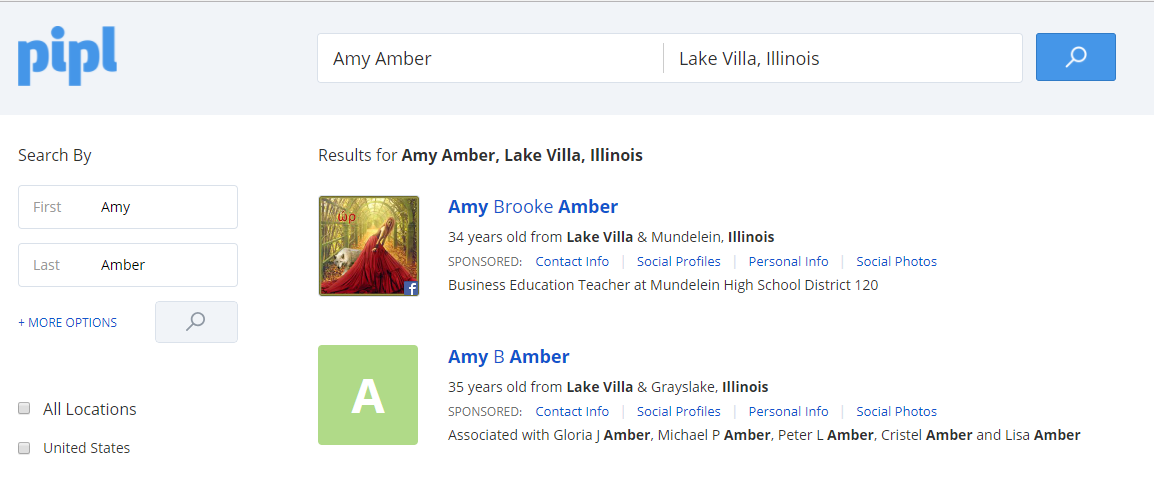 |
| Screenshot of Pipl results |
I then checked out Intelius, which provided many results. Again, some information was correct, while other data was completely inaccurate. Many of the locations associated with my name are were actually my dad's locations, however, I did not reside with him.
 |
| Screenshot of Intelius results |
Instant Checkmate seemed to have the most accurate information in the quick report that was generated. This website seemed to be the only site that associated my parents with me and not just my in-laws.

I did check Blockshopper, however, I couldn't locate any information on myself just by searching my name, however, when I put my address in then all the data available (taxes, schools, square footage, etc) was available. Tax data was dated, but I wish I only paid the amount of taxes that was listed!
Lastly, I took a look at Illinois Teacher Salaries. My students love to look for all their teachers salaries! The information was accurate from a few years ago, but it did not display my current salary.
Overall, I really enjoyed this assignment. I get a little nervous knowing what type of information is available by doing a few quick searches. But as Nicole mentioned in her video, if someone wants to find you they will. I think this assignment is a great way to make you aware of what public records exist and how you are presented on the web. All student should data mine themselves to ensure what it out on the web is representative of their current selves.
Thursday, October 5, 2017
Web 2.0 Tool: Quizizz
This week I explored the Web 2.0 Tool called Quizizz. I was excited to find it, as it is similar to Kahoot, and my students love Kahoot! Creating a Quizizz account was very easy as you can sign in using your Google Account. Once you are logged in you can choose to create your own quiz or choose from the hundreds of already created public quizzes.
Check out my screencast to get step-by-step directions!
One of the best things about Quizizz over Kahoot is the rich data a teacher receives. Once the student has completed the quiz the results can be seen by the teacher including, which questions a student gets correct and incorrect. It also ranks that student by their results, so it is easy to see which students may need a review or reteaching. Quizizz also provides a review for the students, if they want to complete it.
Don't have enough time to do the quiz in class? No problem! Quizizz allows you to assign it for homework, have the students complete it outside of class.
Kahoot vs. Quizizz: Which is Right for You?
Check out my screencast to get step-by-step directions!
One of the best things about Quizizz over Kahoot is the rich data a teacher receives. Once the student has completed the quiz the results can be seen by the teacher including, which questions a student gets correct and incorrect. It also ranks that student by their results, so it is easy to see which students may need a review or reteaching. Quizizz also provides a review for the students, if they want to complete it.
Don't have enough time to do the quiz in class? No problem! Quizizz allows you to assign it for homework, have the students complete it outside of class.
Kahoot vs. Quizizz: Which is Right for You?
Wednesday, September 27, 2017
Professional Learning Network
Twitter was an app on my phone that I occasionally would look at to see photos administrators, teachers, and some students would post to #mundypride. I felt like it would keep me "in the know." I did not realize how many useful tools, resources, and people were available at my fingertips! Thanks to the Twitter Chat assignment I now see the value in Twitter and the endless possibilities.
I was a little nervous to participate in my first Twitter Chat, however, I read the "How to Participate in a Twitter Chat" and took the author's advice. I signed up for a Hootsuite account and played with that for a couple of days, then I felt prepared to actually be an active participant in a chat. I tried to participate in a couple of chats, but seemed like their wasn't much action and realized that the chat didn't seem to be happening! But, I didn't give up. I was finally able to join the #gafechat and had a great experience. I loved the structure of the questions and answers and really appreciated people adding A1, A2, etc. before their response, so it was easy to follow and understand which question they were answering. I left the chat not only feeling proud of myself for participating, but also had useful tools to consider using and access to Kelly Fitzgerald's website (#gafechat moderator) to utilize for future instructional coach inquiries.
Connect with me on Twitter: @mrsamber10
Interested in a Twitter Chat? Find a chat to join here: Twitter Chat Schedule
I was a little nervous to participate in my first Twitter Chat, however, I read the "How to Participate in a Twitter Chat" and took the author's advice. I signed up for a Hootsuite account and played with that for a couple of days, then I felt prepared to actually be an active participant in a chat. I tried to participate in a couple of chats, but seemed like their wasn't much action and realized that the chat didn't seem to be happening! But, I didn't give up. I was finally able to join the #gafechat and had a great experience. I loved the structure of the questions and answers and really appreciated people adding A1, A2, etc. before their response, so it was easy to follow and understand which question they were answering. I left the chat not only feeling proud of myself for participating, but also had useful tools to consider using and access to Kelly Fitzgerald's website (#gafechat moderator) to utilize for future instructional coach inquiries.
 |
| Q6 Answer |
 |
| Q1 Answer |
 |
| Q2 Answer |
Checkout the complete #gafechat on Lesson Design in a Digital Age here!
Twitter is now going to be a resource for me to stay connected to my school, but also to connect to other business teachers all over the country and even the world (Currently following 77 people, have 9 followers and counting 🙌). I am looking forward to participating in more chats and expanding my PLN.
Connect with me on Twitter: @mrsamber10
Interested in a Twitter Chat? Find a chat to join here: Twitter Chat Schedule
Subscribe to:
Posts (Atom)
-
Prior to my school going 1:1, the staff received professional development on integrating technology into the classroom. The school chose to ...
-
 I had never heard the term "digital tattoo" before, however, it makes complete sense. So what is a digital tattoo? "Our digit...
 -
 As educators it is important to understand our students on a personal level, but also to look at data and research about their generation. T...


