Wednesday, November 15, 2017

Technology Proposal Mid-Point Reflection

Having completed the first three steps of the Technology Proposal Plan, I feel that I am off to a good start! The process of identifying a problem or need was fairly easy for me as I am always trying to find more ways to make the curriculum in Accounting 1 more relevant and engaging for high school students. Thus, my plan entails incorporating active learning strategies and tools into the Accounting 1 course. This proposal aligns with my school's current initiatives as professional development for teachers has been structured around creating and implementing high quality assessments and Webb's Depth of Knowledge levels 3 and 4.

The hardest part about the process has been trying to narrow down the active learning tools I would like to incorporate this semester. There are so many different tools and I am excited about each one, however, I want to make sure I am selective about the tool to ensure the learning process is effective. Finding and researching the tools is one of the most enjoyable aspects of the proposal, as I have so many ideas, and I have even been able to apply the tools in other courses I teach.

I have really appreciated learning the instructional design models such, as, ADDIE and TPACK. It makes understanding the process, so much clearer and really makes the instructional designer think about the purpose of the lesson and use the most appropriate tools that will make the lesson more effective, efficient, and engaging. I really enjoy taking a step back from the day-to-day routine to look at my lessons, to ensure they are well-designed to meet the needs of all my students.

I am looking forward to implementing and evaluating the plan!

Friday, October 13, 2017

Social Media Blog

The article "Embracing Mobile Devices and Social Media Tools" really resonated with me. I completely agree that as educators we need to teach students responsible use of technology and social media rather than block it and try to prevent students from accessing it. There are many times in class when students pull their phones out to check or send text messages, I typically have a private conversation with these students to help them understand when it would be an appropriate time to check their phones. Some teachers choose to take the students phone, but I find that no learning experience has occurred. I love the examples of the schools that use technology and social media to enhance learning. I really liked the idea of students creating online portfolio to help promote themselves for future educational experiences and/or careers.

I also read the article "A Teenager's View on Social Media" by Andrew Watts, which I loved! I found his explanations of various social media to be spot on. Sometimes I feel so much older than my students when it comes social media. I am a Facebook user, so it is interesting to here that my students tend to run away from Facebook. As mentioned in a previous blog, I think my school uses all the wrong social media outlets to reach students, thus communication is missed. We have a huge opportunity to reach our students if we meet them where they are and use the social media they use.

Tuesday, October 10, 2017

Reflection

Technology in education is not going away and it is important for educators to be aware of the topics and resources that are available. EDU 776 has helped to increase my knowledge on various topics in technology and education, but also provided me resources that I can use in my current classes.

The educational technology research that we review in module 5 helped me to understand where my school currently stands with technology resources, communication, and student usage and where we need to go. Making decisions based on the data will help us move forward in an appropriate way with our students, parents, and community.

One of my favorite aspects of this class was learning Web 2.0 tools that I can use with my students. I love to learn about practical tools and resources that can benefit my students and myself! There are so many great tools available, however, not enough time to fully explore them all. I really appreciated watching everyone's screencasts. I have already used Quiznetics, and I am planning on using Seesaw in the future. I love that students can share their work with friends and family.

Finally, I have really enjoyed using Blogger. It has been so easy and user-friendly. My head is racing with ways I can use Blogger in my personal life! I would love to share more photos and stories about what my family is up to and I love that I can make in a closed community and help keep my son's digital tattoo minimal.

Thanks for a great course!

Useful sites:
Teachers' Favored Web 2.0 Tools
How to Start a Family Blog

Digital Tattoo

I had never heard the term "digital tattoo" before, however, it makes complete sense. So what is a digital tattoo? "Our digital identity, or tattoo, is the permanent collection of data about us that is available online. Each time we post a picture, a blog, a status or a tweet, we are adding to that digital identity' (Binary Tattoo).

As a parent I am very aware of my son's digital tattoo. He is only two years old, however, I have posted pictures of him on social media, so has his grandma! However, I make a conscious effort to minimize his digital tattoo. I am minimalist when it comes to sharing publicly on social media, only a few posts a year and I often use my maiden name on accounts, so my students can't find me. 

When I began my data mine on myself I was expecting to find very little. This was true with my initial Google search of my name (both married and maiden name). I have Googled myself in the past and if anything came up, I tried to hide it or eliminate it as soon as possible! Also, nothing came up when I searched for myself on Nuwber. I felt like I was striking out (but was secretly relieved).

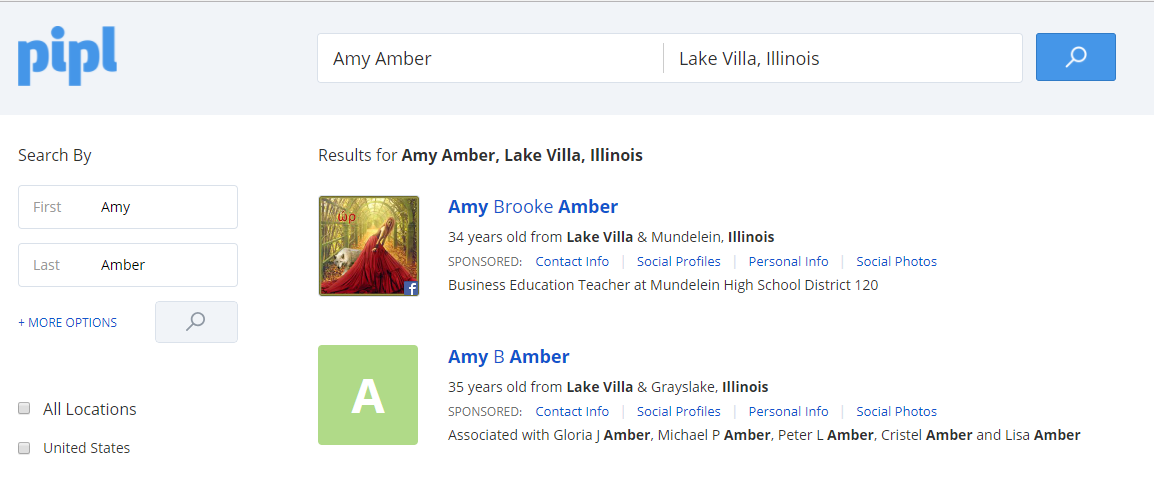
Then, I finally had some luck on Pipl! The information Pipl provided (see below) had some correct information (name, age, employer, places, and associated people), but was incorrect with the profile picture, username, and additional names. 

Screenshot of Pipl

I then looked at the second result, which had much less information, but it all seemed accurate.

Screenshot of Pipl results

I then checked out Intelius, which provided many results. Again, some information was correct, while other data was completely inaccurate. Many of the locations associated with my name are were actually my dad's locations, however, I did not reside with him.

Screenshot of Intelius results

Instant Checkmate seemed to have the most accurate information in the quick report that was generated. This website seemed to be the only site that associated my parents with me and not just my in-laws.


I did check Blockshopper, however, I couldn't locate any information on myself just by searching my name, however, when I put my address in then all the data available (taxes, schools, square footage, etc) was available. Tax data was dated, but I wish I only paid the amount of taxes that was listed!

Lastly, I took a look at Illinois Teacher Salaries. My students love to look for all their teachers salaries! The information was accurate from a few years ago, but it did not display my current salary.

Overall, I really enjoyed this assignment. I get a little nervous knowing what type of information is available by doing a few quick searches. But as Nicole mentioned in her video, if someone wants to find you they will.  I think this assignment is a great way to make you aware of what public records exist and how you are presented on the web. All student should data mine themselves to ensure what it out on the web is representative of their current selves.


Thursday, October 5, 2017

Web 2.0 Tool: Quizizz

This week I explored the Web 2.0 Tool called Quizizz. I was excited to find it, as it is similar to Kahoot, and my students love Kahoot! Creating a Quizizz account was very easy as you can sign in using your Google Account. Once you are logged in you can choose to create your own quiz or choose from the hundreds of already created public quizzes.

Check out my screencast to get step-by-step directions!


One of the best things about Quizizz over Kahoot is the rich data a teacher receives. Once the student has completed the quiz the results can be seen by the teacher including, which questions a student gets correct and incorrect. It also ranks that student by their results, so it is easy to see which students may need a review or reteaching. Quizizz also provides a review for the students, if they want to complete it.

Don't have enough time to do the quiz in class? No problem! Quizizz allows you to assign it for homework, have the students complete it outside of class.

Kahoot vs. Quizizz: Which is Right for You?

Wednesday, September 27, 2017

Professional Learning Network

Twitter was an app on my phone that I occasionally would look at to see photos administrators, teachers, and some students would post to #mundypride. I felt like it would keep me "in the know." I did not realize how many useful tools, resources, and people were available at my fingertips! Thanks to the Twitter Chat assignment I now see the value in Twitter and the endless possibilities.

I was a little nervous to participate in my first Twitter Chat, however, I read the "How to Participate in a Twitter Chat" and took the author's advice. I signed up for a Hootsuite account and played with that for a couple of days, then I felt prepared to actually be an active participant in a chat. I tried to participate in a couple of chats, but seemed like their wasn't much action and realized that the chat didn't seem to be happening! But, I didn't give up. I was finally able to join the #gafechat and had a great experience. I loved the structure of the questions and answers and really appreciated people adding A1, A2, etc. before their response, so it was easy to follow and understand which question they were answering. I left the chat not only feeling proud of myself for participating, but also had useful tools to consider using and access to Kelly Fitzgerald's website (#gafechat moderator) to utilize for future instructional coach inquiries.

Q6 Answer
Q1 Answer
Q2 Answer

Checkout the complete #gafechat on Lesson Design in a Digital Age here!

Twitter is now going to be a resource for me to stay connected to my school, but also to connect to other business teachers all over the country and even the world (Currently following 77 people, have 9 followers and counting 🙌). I am looking forward to participating in more chats and expanding my PLN.

Connect with me on Twitter: @mrsamber10

Interested in a Twitter Chat? Find a chat to join here: Twitter Chat Schedule

Tuesday, September 26, 2017

Educational Technology Research

As educators it is important to understand our students on a personal level, but also to look at data and research about their generation. This week I enjoyed looking at a variety of statistics about my students' generation and technology use.

Statistics that jumped out at me from the Speak Up "Social Media Use In and Out of School: Students, Parents and Educators Speak Up!" report were regarding communication. I find it interesting that high school students tend to use Instagram and Snapchat rather than Facebook and Twitter. However, social media that most schools use are Facebook and Twitter. In fact, 77% of administrators use Twitter to communicate to parents and students. There seems to be a disconnect between the channels students use and what schools use. I know at my current school we are always struggling with how to communicate information to students. We tend to communicate how we (adults) do...through email and Twitter. Looking at the useful data Speak Up provides, we need to meet students where they currently are and switch communication channels. 

Checkout the complete report here
Source: Speak Up!
I loved seeing that 55% of parents want to receive text messages from their child's school or teacher. Again, we tend to use phone or email blasts to reach parents, why not text message them? It would be great to know a parent's preferred method of contact, so it is easier to connect to discuss their child's education. Having parent contact with every student can only help the student's overall academic experience.

I also found it interesting that 76% of high school students use YouTube, however, only 27% of teacher either use or plan on creating videos to supplement content taught in their courses. YouTube would be a great way to help support students through the learning process. 

This valuable research is important to review every year, as students and technology change so rapidly. I am definitely going to keep these reports in my "toolbox" to ensure I am meeting my students needs.

Blog Reflection #2 - EDU 781